WordPress Theme Showcase Plugin

By StrangeWork.com: I’m excited to announced the release of my latest WordPress plugin, the WordPress Theme Showcase Plugin.
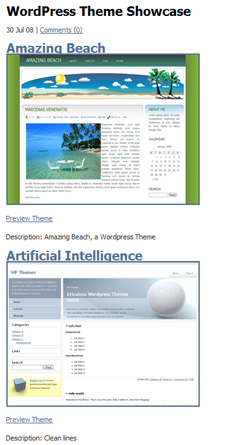
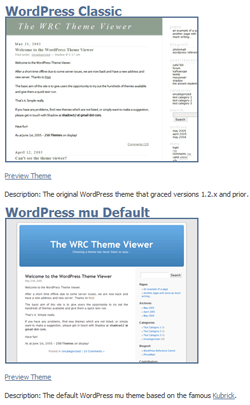
This plugin will display all themes located in wp-content/themes in a showcase gallery with theme screenshots and preview links. This is a great plugin for designers looking to showcase their work or anyone that wants an easy way to display and preview multiple themes.
Updated: I added screenshots at the bottom of this post
This plugin is based off of the WordPress Theme Preview plugin created by Ryan Boren.
Features:
- Display a showcase of your themes
- Theme screenshots are displayed with titles and descriptions
- Easily preview all themes loaded in WordPress
- Allow anyone to preview themes, not just administrators
- Works with both WordPress 2.x and WordPress MU
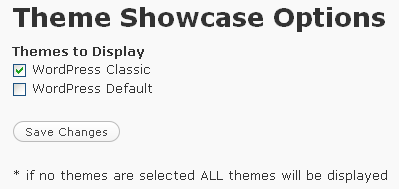
- New settings page allows you to pick what themes are displayed
Installation:
Step 1.
Unzip the file and upload theme-showcase.php to your WordPress plugin folder.
Step 2.
Activate the plugin in your WordPress Admin section under the plugins menu
Step 3.
Insert this code:
[showcase]
Anywhere in your post or page and save. That’s it!
Download: WordPress Theme Showcase Plugin
Compatible up to: WordPress and WPMU 2.8.2
Please visit the Support Forum with any bugs, comments, feature requests, or hate mail!
Popularity: 13% [?]
Related posts:
Tags: plugin, theme preview, WordPress


Pablo DiCiacco
said
am July 31 2008 @ 9:32 pm
Hello,
This is a great plugin and far easier than the “blog-mechanics-theme-gallery” plugin” (the only other comparable one I know of).
I want to ask you if there is something more I need to do to get the “theme-preview” to work?
Thank you in advance for any help you can offer.
Sincerely,
Pablo
mocona
said
am July 31 2008 @ 10:46 pm
Pablo right, theme preview is not working, unfortunately
Brad
said
am August 1 2008 @ 11:45 am
Hey guys, I found a small bug that screwed up the wordpress URL in the paths. I updated the plugin on here so try downloading the plugin again and let me know how it goes. Thanks!
Jake
said
am August 11 2008 @ 1:03 pm
Hey dude any chance you could show me how to display this plugin directly with php? Or maybe you haven’t built that functionality into the plugin yet… I’d like to be able to use this plugin anywhere in a design, not just on a page! Normally plugins have both options, the page insertions (like the [showcase] thing you’ve done) and the php code…
Steve Bruner
said
am November 1 2008 @ 2:31 pm
Really awesome plugin! So easy to use.
Two questions:
1) How can I control how many thumbnails are shown per page? I want to show 100 different themes, but only 10 per page.
2) Does the preview have to open in a new window? I removed the three instances of target=_blank in the plugin, but it stopped working.
Any help you can provide would be great.
Thanks again for an awesome plugin.
Steve
Kretzschmar
said
am February 8 2009 @ 4:57 am
Fantasitc Plugin.
Maybe you could add in the future:
- css classes to all elements (for styling purpose)
- option to hide the standard wordpress themes
Brad
said
am February 11 2009 @ 12:59 pm
Thanks Kretzschmar! I’m going to revisit this plugin soon and add some new features. I just updated the plugin to work in 2.7 so make sure to download from the WP Plugin repository. I updated the download link in this post to point there as well:
http://wordpress.org/extend/plugins/wordpress-theme-showcase-plugin/
Jenni
said
am March 3 2009 @ 3:40 pm
Hey, I love this plugin but is there any way to use it as a theme switcher for visitors? I.e. you click the screenshot or title and it changes the theme rather than just previewing it.
etoainshrdlu
said
am March 14 2009 @ 9:33 am
I love this thing!
would is be possible to modify this to create unique sub-domains. i.e.
amomsguideto.raising.successful.kids.com
would have a different theme than:
adadsguideto.raising.successful.kids.com
WordPress Theme Demo Plugin said
am March 24 2009 @ 9:49 am
[...] would like to thank Brad Williams for his plugin. His code was very helpful in the creating of this [...]
Georg
said
am April 10 2009 @ 8:53 pm
Hi,
Fantastic plugin. Exactly what I was looking for.
I have installed it on my Danish WordPress portal: http://wordpress.blogos.dk/se. I have 11 themes installed. Vladimir Prevolac’s Amazing Grace and Blue Grace are two of them.
The content of these two folders are similar, but not identical. The names and descriptions in the css-files are different, as appropriate.
Nevertheless, only Amazing Grace, but not Amazing Blue is displayed by the plugin.
Any suggestions as to why this is the case?
Thank you very much in advance.
Et fantastisk udstillingsvindue! « WP - tips, temaer og plugins said
am April 11 2009 @ 3:43 am
[...] dansk udgave af WordPress Theme Showcase-pluginnet: WordPress Theme Showcase Plugin (0) Websteder: WordPress Theme Showcase Plugin. Udgaven, der ligger på WordPress.org angives at være version 1.2, men filen hedder 1.0.6.0. Så [...]
Georg
said
am April 11 2009 @ 4:42 am
By the way, the download zip says that it is version 1.0.6.0, but you state on http://www.strangework.com/wordpress-plugins/ that it is version 1.2. Which is correct?
Georg
said
am April 12 2009 @ 1:16 am
Well, I found the culprit, which has nothing to do with the Showcase plugin. I had inadvertently added the content of two themes into one zip file.
Your plugin works very well. Thank you!
Courtney Bostdorff
said
am April 20 2009 @ 9:35 pm
Hi Brad, Great Plugin!
I see that someone has already asked this question but I didn’t see an answer from you.
Is there anyway to define the number of themes shown on a page. I have over 1000 themes I would like to showcase, but I’ll tell you, loading all of the themes on just one page takes a really long time. Some kind of built in pagination would be great.
Would greatly appreciate a reply back.
GREAT WORK!!
Brad
said
am April 21 2009 @ 7:54 am
Excellent idea! I’m planning on adding some new features to the plugin soon. Paging will most likely be one of those features along with an optional “download theme” link.
Takuya
said
am April 22 2009 @ 6:30 am
I’m using wpmu 2.7, but this plugin is showing all the themes in themes directory even if the theme is only available to specific blog (wpmu function). Perhaps we need a function to show/hide under plugin option?
Andrew Slack
said
am April 28 2009 @ 11:10 am
Hi Guys/Brad,
Is there any way to exclude a theme from the display, ideally I would like to exclude the active theme to only show my examples:
http://examples.moreniche.com/blog/
Any help is appreciated.
Brad
said
am April 29 2009 @ 12:39 pm
Not yet, but that is planned in the next release. Hopefully I will have that finished up in the coming weeks
Riavon
said
am May 10 2009 @ 7:46 am
This is a great plugin, thank you! My question/suggestion is whether we can have the ability to change the size of the thumbnail images, as well as get some control over pagination/the number of thumbnails that show per page. It would also be great to configure the layout, so that (for example) display thumbnails within a multi-column/multi-row grid layout to save visitors from scrolling down endlessly through the entire long list of thumbnails.
Really looking forward to working with this plugin and seeing what comes along next. Great plugin, thanks again!
Troy
said
am May 25 2009 @ 8:13 pm
Hi, I am very excited to find your plugin. I installed it and it looks great however when I demo a a site and then click on one of the pages it loads it back in the current theme. Am I doing something wrong?
Thanks,
Troy
Jeff
said
am June 2 2009 @ 10:26 pm
Hi Brad:
Just wanted to say how much I like your plugin. I just installed it and it works great.
Like someone before me, the only thing I would love is the ability to exclude my current theme from the list, since it’s not on offer.
exemplu 1 :: PTOC TEST said
am July 7 2009 @ 3:48 am
[...] would like to thank Brad Williams for his plugin. His code was very helpful in the creating of this plugin. [...]
Georg
said
am July 20 2009 @ 1:13 am
Hi,
The plugin sometimes fails with the following error: Wrong datatype for second argument in line 202.
Any suggestions?
Thank you for a very fine plugin.
Georg
said
am July 20 2009 @ 1:14 am
PS: “Sometimes” does not mean now and then on the same blog. It fails on some blogs with this error and works on others.
Brad
said
am July 20 2009 @ 9:36 am
Hey Georg thanks for the bug reporting. I fixed the bug and pushed up version 1.4.2 with the fix. You can download it on WordPress.org or just update the plugin automatically.
http://wordpress.org/extend/plugins/wordpress-theme-showcase-plugin/
Let me know if you have any more issues or errors, thanks!
Georg
said
am July 21 2009 @ 2:23 am
Hi again,
Version 1.5.0 does not install at my systems. I extracted the content of the trunk folder, and that works. But is the zip file packaged this way by intention?
Georg
said
am July 21 2009 @ 2:31 am
By the way, the disabling of the preview link does not remove the ?preview-theme link in the H3 header.
Brad
said
am July 21 2009 @ 7:57 am
Hey Georg, both issues have been fixed in 1.5.1. WordPress.org incorrectly packaged up the plugin file which caused it to crash during install. The new version was packaged correctly and I fixed the header still allowing previews.
I also setup a Support Forum. If you have any other issues please post them here:
http://webdevstudios.com/support/forum/wordpress-theme-showcase-plugin
ChuckS
said
am August 3 2009 @ 9:22 pm
Hi. Great plugin! I was wondering if there is an answer to Troy’s question above. Should other pages also load into the theme being demo’ed? My site also reverts back to the orginal theme if another page is selected. Thanks!